SMS Marketing Consent: Opt-Ins and Opt-Outs
Text marketing is one of the most effective ways to reach your clients. With open rates over 90%, your messages are almost guaranteed to be seen. But before you can start sending SMS marketing campaigns, clients must give clear, documented consent in accordance with laws like the Telephone Consumer Protection Act (TCPA).
Meevo and Emma are built to help you do just that, giving you the tools and structure to collect and manage consent confidently and compliantly. While your business is ultimately responsible for legal compliance, the workflows supported by Meevo and Emma make it easy to stay on the right track.
In this article, you’ll learn:
- How SMS consent is synced between Meevo and Emma
- How to collect valid opt-ins (and manage opt-outs)
- How to use Emma Segments to check SMS status
- Best practices for re-subscribing opted-out clients
Important: Texas Senate Bill 140 (SB 140) expands the definition of "telephone solicitation" to include "transmission of a text or graphic message or of an image" intended to promote products or services. This means marketing text messages sent to Texas residents will now be subject to Texas telemarketing laws and the Texas Deceptive Trade Practices Act. If your business operates from Texas or sends marketing messages (voice or text) to Texas residents, you may need to register with the Texas Secretary of State as a "seller". We recommend checking with your legal counsel to see if the Texas SB140 amendment applies to your business.
How SMS consent is managed between Meevo and Emma
To protect your business and your clients, Emma enforces strict SMS opt-in rules that are intentionally designed to prevent accidental or non-compliant updates to consent statuses.
These guardrails ensure your SMS list remains fully compliant, even as client profile evolve in Meevo.
Why the initial sync is important
SMS Marketing uses the same client sync as Email Marketing, so there is no separate SMS Marketing sync to configure. Clients who meet your Email Marketing sync criteria are synced from Meevo to Emma as part of the existing integration.
When a client’s profile first syncs from Meevo to Emma, their Use for text marketing setting in Meevo determines their initial Promotional SMS status in Emma.
After the initial sync, the behavior of Use for text marketing depends on the client's SMS Marketing consent status and history.
|
SMS Marketing consent status |
Use for Text Marketing in Meevo |
Action available |
|---|---|---|
|
Never opted in |
Unchecked and interactive |
The client or staff member can opt the client in through Meevo. Selecting the option sends the opt-in request to Emma. |
|
Opted in |
Checked and interactive |
The client or staff member can opt the client out through Meevo. |
|
Opted out |
Unchecked and locked (read only) |
No action is available in Meevo. The option is read-only and cannot be used to opt the client back in through Meevo. |
|
Re-opted in through an Emma Signup Form |
Checked and interactive |
Emma restores the opted-in status in Meevo. The client or staff member can opt the client out again through Meevo. |
Important: There is a difference between a client who has never opted in and a client who has opted out. If a client has never opted in, they can provide consent through the available Use for Text Marketing option in Meevo. Once a client has opted out, however, the option becomes locked and cannot be used to opt the client back in. A valid re-opt-in through Emma restores the client's opted-in status in Meevo.
Managing SMS consent after a contact is synced
After a client has been synced between Meevo and Emma, their consent history determines which SMS Marketing actions are available:
- A client who has never opted in can opt in through Meevo. Selecting Use for text marketing sends the opt-in to Emma.
- A client who is currently opted in can opt out through Meevo by deselecting Use for text marketing.
- A client who has opted out cannot be opted back in through Meevo. Use for text marketing is unchecked and locked.
- If an opted-out client provides valid consent through an Emma Signup Form, Emma sends the updated status to Meevo. Use for text marketing becomes checked and interactive again.
- You cannot manually change an opted-out client's Promotional SMS status back to Active within Emma. Clients must provide consent through a supported opt-in process.
- Emma maintains audit logs showing when and how consent was granted.
These safeguards prevent an explicit opt-out from being accidentally overridden while still allowing clients who have never opted in to provide consent through supported Meevo workflows.
How NEW clients opt into SMS Marketing
It’s important to collect SMS consent using a method that’s both auditable and compliant. Doing this upfront keeps you legally covered and helps grow a high-quality, engaged SMS list from day one.
New clients who've never been synced can opt in using several different methods:
Recommended opt-in methods:
- Meevo Client Intake Forms (CIFs): Add SMS consent language and checkboxes to your intake forms so you can capture consent during client onboarding, with no extra steps required later.
- Meevo Client-Facing Sites: New clients signing up via Online Booking, eGift, or Online Membership Sales can opt into SMS marketing as part of the account creation process.
- Emma Signup Forms: This method covers clients who join your marketing list before they are added to Meevo. These forms offer opt-in checkboxes and customizable legal language that help ensure TCPA compliance.
Note: Only standard "Regular" Emma forms support SMS opt-ins. SMS opt-ins cannot be obtained through Lightbox forms.
How ALREADY-SYNCED clients opt into SMS Marketing
If a synced client has never opted in, the Use for text marketing option remains available in Meevo. The client or staff member can select it to opt the client in, and Meevo sends the opt-in to Emma.
If the client has previously opted out, Use for text marketing is locked in Meevo. The client must provide consent again through a supported re-subscription method.
How clients who previously OPTED OUT can re-subscribe
If a client opted out by replying STOP to a marketing text message, they can re-subscribe by replying START in the same message thread.
If the original thread is no longer available, the client can re-opt in using an Emma Signup Form. When the client successfully re-opts in through Emma, the Emma updates Meevo and Use for text marketing becomes checked and interactive again. Send an email campaign to your "SMS opted-out" Segment in Emma, encouraging clients to rejoin your SMS list.
Note: To comply with Federal law, Emma does not allow manually opting clients into SMS Marketing (toggling a client's Promotional SMS status in Emma to "Active"). Clients must provide consent through a compliant opt-in process.
Why use Emma signup forms?
Emma Signup Forms are the most effective and compliant way to capture SMS consent from both new and existing clients. They’re designed with built-in safeguards that help protect your business and ensure clients are genuinely opted in.
Best Practice: Only standard "Regular" Emma forms support SMS opt-ins. SMS opt-ins cannot be obtained through Lightbox forms. We highly recommend reviewing Emma’s Help Article on SMS Fields in Signup Forms for best practices on capturing consent and adding legal terms.
Emma Signup Forms are an effective, compliant way to obtain consent because they:
- Collect explicit, auditable consent that meets TCPA and carrier standards
- Include customizable legal language and opt-in checkboxes
- Automatically update the client's SMS status in Emma
- Work for clients not yet in Meevo as well as those already synced
- Help re-engage unsubscribed clients or those who were never opted in
Tip: Always include Emma Signup Forms on your website, booking pages, and email campaigns to make it easy for clients to opt in.
Opting out clients from receiving SMS Marketing
- Clients can unsubscribe from SMS Marketing at any time by replying STOP to any promotional text. This action immediately optsn them out of SMS marketing texts.
Tip: To maintain compliance and build trust, always include clear opt-out instructions in your campaigns (for example, "Reply STOP to unsubscribe.").
- Clients who are currently opted in can also be opted out through Meevo by deselecting Use for text marketing.
- Additionally, users with access to the Audience tab in Emma can manually set a contact's Promotional SMS Status to Opt-out to reflect a client's unsubscribe request or preference.
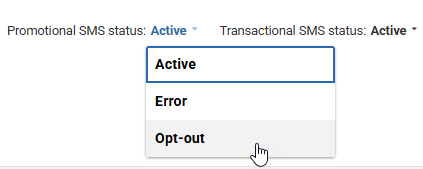
Creating Segments in Emma to determine opt-in status
You can use Emma Segments to filter clients based on their SMS opt-in status:
- Clients opted into SMS Marketing: Create a Segment in Emma with an SMS Promotional Status of Active.

- Clients who are not opted into SMS Marketing: Create a Segment in Emma for clients with a Promotional SMS Status of Opted-out and a valid email address.
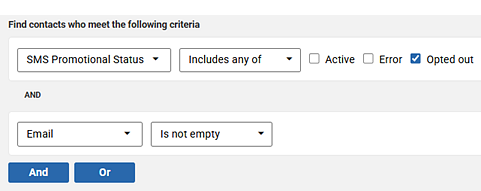
Best practices in Meevo for obtaining consent
Meevo offers settings and customizations that allow you to collect and manage consent in line with industry standards:
- Make sure you enable Require phone number when saving a client profile in Business Preferences > Client. Most people use mobile numbers, and by asking for it up front, you’re more likely to get the number you need for notifications.
- There’s another setting in that same section called Select use for text marketing when creating a new client profile. Note that turning this on automatically enables the marketing SMS opt-in option, which goes against industry guidelines. Clients are supposed to actively agree to receive marketing texts.
- Use clear, visible language on client intake forms to explain what clients are agreeing to.
- Always include opt-out instructions in your marketing texts (e.g., “Reply STOP to unsubscribe”).