MeevoPay Transactions and Refunds
Credit Card Transactions
Billing Address Verification
A complete billing address is required for online payments and card-on-file management in Online Booking, eGift, Online Membership Sales, and Self-Pay. It is also required whenever a card on file is added or updated in Meevo.
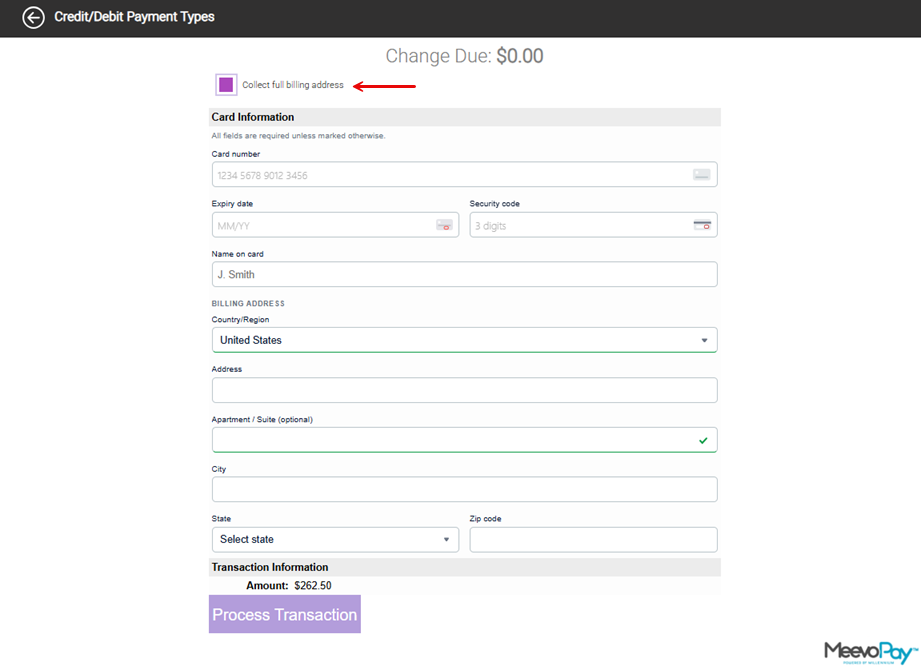
Register Hosted Page payment processing is the one exception to this rule. For MeevoPay payments processed through the Hosted Page in the Register, your business can choose whether to collect the additional billing address information.
- A Collect Full Billing Address option is available on the Credit Card payment screen when making a payment using MeevoPay Hosted Page processing.
- When enabled, clients are prompted to provide their full billing address, including country/region, street address, city, state/province, and postal code.
- It is up to your business whether to require this additional information for Register-hosted transactions, allowing you to balance security needs with your desired checkout experience.
Pre-Authorization
- For any transaction over $1.00, MeevoPay performs a pre-authorization check.
- When adding a card on file, MeevoPay conducts a $0.00 pre-authorization to validate the card information.
Security for Card-on-File Payments
MeevoPay provides added protection when clients use a saved card for payments:
- Client Online Transactions (Online Booking, Self-Pay, eGift): Clients must re-enter their CVV to complete a payment when using a card on file. This extra step enhances security by verifying that the purchaser has access to the physical card.
- Front Desk Transactions (In-Store Checkout): Front Desk Employees can choose to require CVV re-entry when using a card on file, offering flexibility for front desk workflows.
- A Re-enter CVV to Validate checkbox is available within the Register's Cards on File area.
- Enabling this option reveals a Security Code field below the list of saved cards, which must be filled in to complete the transaction.
Manual Entry Restrictions
Manually entering card numbers on a pinpad can increase the chance of chargebacks. To mitigate this, the Prompt for manual entry of credit card information on the device checkbox is not available when MeevoPay is the active Merchant Account.
Receipt Signatures
- Major credit card companies like Visa, Mastercard, American Express, and Discover have largely eliminated the requirement for cardholders to sign receipts or cards for transactions.
- This shift is due to advancements in technology and the widespread adoption of chip-enabled cards and EMV technology.
- While some merchants may still require signatures, especially for certain types of transactions, the overall trend is towards a signature-free experience.
Cards without CVV are in-person (for Canadian businesses only)
For Canadian clients, cards without a CVV can only be accepted for in-person (card-present) transactions. These cards should not be used for card-not-present payments, such as online purchases, keyed entry, or transactions taken over the phone.
Debit Card Transactions
Swiping a debit card usually brings the client right to the signature screen. However, a client will be brought to the "PIN" screen if:
- The debit card issuer requires a PIN, or
- The debit transaction is over $300, in which case a PIN is always required.
Note: On debit transactions, clients do not select the debit type (US Debit or VISA/MasterCard Debit). There is no cost advantage to one over the other, so this step does not appear on MeevoPay devices.
Transaction Details and Reporting
The MeevoXchange is where you can view totals, individual transactions, fees, and export MeevoPay batch details. MeevoPay fees are assessed daily before funds are deposited, so daily deposits are not likely to match the totals displayed on Meevo reports.
Important Details on Refunds
Unreferenced refunds
MeevoPay does not support unreferenced refunds. An unreferenced refund is a refund that is not linked to the original payment transaction.
Refunds to credit cards cannot be voided
Refunds issued to a credit card cannot be voided once they have been processed. This applies even if the register transaction has not yet been finalized; once the refund is successfully applied to the card, it cannot be deleted or voided from the transaction.
Declined refunds
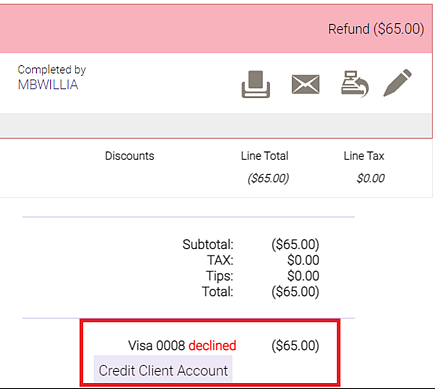
In most cases, refunds to credit cards are processed instantly. In cases where a refund is not processed immediately, you can easily locate the transaction in Transaction Editor to verify it was declined, and then resolve the refund as you see fit.
- To locate a declined refund in Transaction Editor, select Advanced Filters and enable the checkbox Declined refund transactions. Applying this filter limits the results to declined credit card refunds processed through MeevoPay.
- Select a refund transaction to expand its details. Verify the status reads Declined. Declined refunds cannot be reprocessed, so in lieu of a refund we recommend providing account credits, points, or a gift card to the client for the amount of the refund.
Interac debit card refunds (Canadian businesses only)
MeevoPay does not provide an option to refund a physical Interac card at the terminal. Cardholders can contact their bank for more information about restrictions associated with their card. These restrictions are controlled by the cardholder’s bank, not by Meevo or your business.
If a refund is requested, you can refund the client using one of the following payment methods:
- Cash
- Check
- Gift card
- Account credit
Note the refund cannot be issued to another credit or debit card.
Contact Support if you need assistance refunding the transaction through one of these methods:
(973) 402-9500 x 2 or toll-free (888) 813-2141 x 2
Email: support@millenniumsi.com
Chat: Live Chat with Support
Related Topics
- MeevoPay: Features and Benefits
- MeevoPay: Funding, Rates, and Fees
- MeevoPay: Details on Card Readers
- MeevoPay: Applying for a Merchant Account
- MeevoPay: Migrating Worldpay Tokens to MeevoPay
- MeevoPay: Merchant Account Setup
- MeevoPay: Surcharges
- MeevoPay: Reconciling Transactions and Chargebacks
- MeevoPay: HSA/FSA Accounts
- MeevoPay: Setting Up SpaFinder Gift Cards